The problem, in one paragraph
A user in Tokyo records an event at 2:30 in the afternoon. A user in New York opens the record three weeks later. If you store “14:30” and show “14:30,” you have shown them a time that is eleven hours off from when it actually happened — and if that “14:30” crossed a daylight-saving boundary, it may be a local time that did not exist at all.
Every date-and-time bug is a version of the same root mistake: confusing an instant (a point on the universal timeline) with a local reading of that instant (what a clock shows in one place). The fix is a single, strict contract that this whole article is built around:
The best part? You can watch a working implementation at the end, built with rails g generators against MariaDB. Let’s get into it.
Time is not one thing

Three distinct ideas are routinely collapsed into one “time.” Keep them apart and nearly every time bug disappears.
| Concept | What it is | Example | Where it lives |
|---|---|---|---|
| Instant (or epoch) | A single point on the universal timeline, independent of place. | 2026-08-19 18:30:00 UTC | Your database, your wire format. |
| Time zone | A named rule mapping instants ↔ local clock readings (offset + DST rules). | America/New_York, Asia/Tokyo | IANA tz database; a user’s profile; the browser. |
| Local time (wall clock) | What a clock displays for an instant in a given zone. | 2:30 PM EDT | The screen, the form, the report. |
The IANA time zone database
Every zone is identified by a name like America/Chicago or Asia/Kolkata, not by a fixed offset. That matters because offsets change — for daylight saving and for outright political changes (India’s +05:30, Newfoundland’s −03:30, and the odd half-hour zones that break “offsets are whole hours” assumptions). The IANA tz database is the authoritative source; Ruby’s TZInfo and JavaScript’s Intl both consume it. Always name the zone; never store a bare offset like -05:00 as your truth.
Storing time in MariaDB

First, decide what you are recording
Not every “time” is an instant. Ask which of these you have before you pick a column type:
- Instant — “when did it happen?” (a booking start, an event). Store as UTC.
- Local date — “the birthday” or “the invoice due date.” Store as a
DATEwith no time component; a zone is meaningless. - Recurring local rule — “office hours 9:00–17:00 local.” Store the local wall time plus the zone name, and resolve to an instant only when you need one.
DATETIME vs TIMESTAMP
MariaDB/MySQL gives you two tempting types. The trap with TIMESTAMP is that the server converts on read and write using its own session time zone — a hidden dependency on server config that has bitten teams for decades. DATETIME is inert: it stores and returns exactly the bytes you gave it. That predictability is exactly what you want if you commit to one rule:
DATETIME(6) values as UTC, always. The column is just a UTC instant in a human-readable shape. Rails makes this automatic — see below.Use DATETIME(6) (six fractional digits) so sub-second precision survives round-trips. And because the app is single-writer and single-timezone (UTC), the inert column is both safe and easy to reason about.
The migration (real code from the demo)
# This migration generates the "records" table for the test CRUD.
#
# Columns:
#   name         - text
#   notes        - text
#   happened_at  - datetime, stored as UTC (the datetime-picker column)
#   + timestamps
class CreateRecords < ActiveRecord::Migration[7.2]
  def change
    create_table :records do |t|
      t.string :name
      t.text :notes
      t.datetime :happened_at, null: false, default: -> { "CURRENT_TIMESTAMP(6)" }

      t.timestamps
    end
  end
endThree details doing the heavy lifting:
t.datetime :happened_at, null: false— a real timestamp, required.default: → { "CURRENT_TIMESTAMP(6)" }— a sane fallback if no value is given.t.timestamps— Rails’created_at/updated_at, also UTC.
The connection (real code)
# Rails 7.2 database configuration for MariaDB.
#
# Connection details are read from the environment so the same file works
# across any environment. The docker-compose service sets these:
#   DB_HOST, DB_PORT, DB_DATABASE, DB_USERNAME, DB_PASSWORD
#
# For LOCAL development (outside Docker) the defaults below point at
# localhost so `bin/rails db:prepare` works against a local MariaDB too.
default: &default
  adapter: mysql2
  encoding: utf8mb4
  pool: <%= ENV.fetch("RAILS_MAX_THREADS") { 5 } %>
  host: <%= ENV.fetch("DB_HOST", "127.0.0.1") %>
  port: <%= ENV.fetch("DB_PORT", "3306") %>
  username: <%= ENV.fetch("DB_USERNAME", "rails") %>
  password: <%= ENV.fetch("DB_PASSWORD", "rails_secret") %>
  database: <%= ENV.fetch("DB_DATABASE", "work_development") %>
  # Store timestamps as UTC in the database.
  # (Rails already uses UTC internally; this documents the intent.)
  variables:
    sql_mode: "<%= ENV.fetch('DB_SQL_MODE', 'STRICT_TRANS_TABLES') %>"

development:
  <<: *default
  database: <%= ENV.fetch("DB_DATABASE", "work_development") %>

test:
  <<: *default
  database: <%= ENV.fetch("DB_DATABASE", "work_test") %>

production:
  <<: *default
database: <%= ENV.fetch("DB_DATABASE", "work_production") %>timezone override. Rails defaults to treating all timestamps as UTC, which is what we want. The mysql2 adapter sends DATETIME strings verbatim, so a UTC value in goes and a UTC value out comes — no server-side conversion.What Rails does for you
Rails loads every datetime column into a ActiveSupport::TimeWithZone object pinned to config.time_zone (UTC by default). record.happened_at.utc.iso8601 is your canonical string, and Time.zone.parse(...) is the one parser you should trust for incoming values. Never hand-build a time from user input with Date.new and a guessed offset — let the zone-aware APIs do the math.
Presenting time in the user’s zone
The storage rule has a corollary on the way out: the server renders UTC, the browser renders local. The server has no reliable idea what the visitor’s zone is (a VPN changes the IP, not the browser clock), so the conversion belongs in the browser, where Intl knows the visitor’s OS zone.
The contract, end to end
- Server → HTML: embed the canonical UTC value as a data attribute, e.g.
data-utc="2026-08-19T18:30:00Z". - Browser: parse it, convert with
toLocaleString()(which uses the visitor’s zone), and render it — labelled with the real zone abbreviation so it is never ambiguous. - Hover/tooltip: show the stored UTC so a power user can always see the source of truth.
Always label the zone you display
The single cheapest way to prevent “is this my time or your time?” confusion is to print the abbreviation next to the time — 2:30 PM EDT, not 2:30 PM. Get the abbreviation from Intl.DateTimeFormat(..., {timeZoneName:"short"}).formatToParts(), and the IANA id from Intl.DateTimeFormat().resolvedOptions().timeZone.
Building the date/time widgets

We want a widget that (1) shows the value in the user’s local time, (2) submits a UTC timestamp, (3) prefills the stored value when editing, and (4) defaults to “now” in local time when creating. The cleanest way is one widget with two native inputs (a date box + a time box) plus a hidden field that carries the value actually sent to the server.
Why two native boxes beat a custom overlay
<input type="date"> and <input type="time"> give you the OS picker for free — accessible, mobile-friendly, no 40 KB of JS, no z-index wars with modals. The trick is that the visible boxes hold local date/time (which the browser already understands in the user’s zone), while a hidden, named input carries the UTC string that Rails stores. The JavaScript keeps the two in sync.
The server renders the widget (real helper)
module ApplicationHelper
  # Renders the local-timezone datetime picker widget for a form attribute.
  #
  #   local_datetime_picker(f, :happened_at)   # f = form builder
  #
  # Behaviour:
  #   * SHOWS the value in the USER'S LOCAL time zone (native <input type=date>
  #     / <input type=time> rendered by the browser in the visitor's local tz).
  #   * SUBMITS a UTC timestamp through a hidden input -> stored in the DB (UTC).
  #   * On EDIT: the hidden input is prefilled with the stored (UTC) value and the
  #     JS (local-datetime-picker.js) converts it into the user's local timezone
  #     for display in the visible controls.
  #   * On CREATE: the hidden input carries the current UTC "now" and the JS
  #     shows the current local date & time.
  #
  # The widget root is marked data-datetime-widget so the JS can attach.
  #
  # IMPORTANT: the whole widget is built as ONE string that is marked html_safe
  # at the very end, so the closing </div> and the inner <input> tags are emitted
  # verbatim (not HTML-escaped).

def local_datetime_picker(f, attribute, options = {})
    label_text = options.fetch(:label) { attribute.to_s.humanize }
    obj = f.object

    current = (obj && obj.respond_to?(attribute)) ? obj.public_send(attribute) : nil
    # .utc works on both Time and ActiveSupport::TimeWithZone.
    utc_iso = (current.present?) ? current.utc.iso8601.to_s : Time.now.utc.iso8601.to_s

    # Build the hidden input as its own safe fragment (value is HTML-escaped).
    hidden_safe = f.hidden_field(
      attribute,
      value: h(utc_iso),
      data: { dt_hidden: "", dt_initial: utc_iso }
    ).html_safe

    # One plain (unsafe) string for the static markup, concatenated with the
    # safe hidden fragment, then marked html_safe once at the end.
    markup =
      %(<div class="field datetime-widget" data-datetime-widget="">) +
      %(<label class="label" for="dt_#{attribute}">) + label_text.to_s +
      %(</label>) +
      %(<div class="dt-controls">) +
      %(<input type="date" class="dt-date" data-dt-date="">) +
      %(<input type="time" class="dt-time" data-dt-time="">) +
      %(</div>) +
      hidden_safe.to_s +
      %(<div class="dt-preview" data-dt-preview=""></div>) +
      %(</div>)

    markup.html_safe
enTwo things to notice: the visible date/time inputs have no name (so they never submit their own values — only the hidden UTC input does), and the whole widget is built as one html_safe string so the closing </div> is emitted verbatim, not escaped. (Escaping it was a real bug we hit and fixed — it left the widget’s DOM malformed and the picker never populated.)
The JavaScript engine (real code, abridged)
/*
* local-datetime-picker.js
* ------------------------
* A small, dependency-free datetime picker + timezone-awareness layer for Rails.
*
* Datetime picker:
* 1. SHOWS the date/time in the USER'S LOCAL time zone (native date/time inputs
* rendered by the browser in the visitor's local timezone).
* 2. SUBMITS a UTC timestamp (hidden input) -> stored in the DB as UTC.
* 3. On EDIT, the widget is populated with the stored value (converted UTC -> local).
* 4. On CREATE, the widget defaults to the current local date & time.
*
* Timezone awareness (for users who VPN / cross time zones):
* * The header clock shows the current time in BOTH the user's local zone and
* UTC, and labels each with the ACTUAL zone abbreviation (e.g. EDT, CEST)
* plus the IANA zone id (e.g. America/New_York) via the Intl API.
* * localizeUtcStamps() rewrites index/show timestamps to the viewer's local
* zone, labelled with the real abbreviation + IANA id.
* * detectZone() compares the browser's OS timezone (Intl
* resolvedOptions().timeZone) against the timezone implied by the device's
* CURRENT local wall-clock time. A mismatch is the classic "I'm on a VPN /
* physically in another time zone but my OS clock still says home" case, and
* we surface a clear warning banner so the user is never confused.
*
* NOTE: the browser can only ever know the device's OS timezone. A VPN changes
* the IP (and server-side geolocation) but NOT the browser timezone, so the OS
* zone reported by Intl is the device's, not the VPN's. detectZone() catches the
* resulting confusion (OS zone vs. actual wall-clock zone) and flags it.
*/
(function () {
"use strict";
// ---------- small helpers ----------
function p2(n) { return String(n).padStart(2, "0"); }
function fromLocalFields(y, mo, d, hh, mm) {
return new Date(y, mo - 1, d, hh, mm, 0, 0);
}
function toUtcString(date) {
return date.toISOString().slice(0, 19) + "Z";
}
function localFields(date) {
return {
y: date.getFullYear(), m: date.getMonth() + 1, d: date.getDate(),
h: date.getHours(), min: date.getMinutes(),
};
}
/**
* Parse a datetime string that may carry a timezone designator
* (Rails/MariaDB "2026-08-18 16:30:00 UTC" or an ISO string). Returns Date|null.
*/
function parseServerDateTime(str) {
if (!str) return null;
str = String(str).trim();
if (!str) return null;
var m = str.match(/^(\d{4})-(\d{2})-(\d{2})[ T](\d{2}):(\d{2}):(\d{2})(?:\.(\d{1,6}))?\s*(UTC|Z|[+-]\d{2}:?\d{2}|[A-Z]{2,4})?$/);
if (m) {
var y = +m[1], mo = +m[2] - 1, d = +m[3], hh = +m[4], mi = +m[5], s = +m[6];
var frac = m[7] ? Number(("0." + m[7])) : 0;
var tz = (m[8] || "UTC");
if (tz === "UTC" || tz === "Z") {
return new Date(Date.UTC(y, mo, d, hh, mi, s, Math.round(frac * 1000)));
}
var off = tz.match(/^([+-])(\d{2}):?(\d{2})$/);
if (off) {
var sign = off[1] === "-" ? -1 : 1;
var offMin = sign * (+off[2] * 60 + +off[3]);
return new Date(Date.UTC(y, mo, d, hh, mi, s, Math.round(frac * 1000)) - offMin * 60000);
}
return new Date(Date.UTC(y, mo, d, hh, mi, s, Math.round(frac * 1000)));
}
var native = new Date(str);
return isNaN(native.getTime()) ? null : native;
}
// ---------- timezone introspection (Intl API) ----------
/** IANA zone id the browser is running in (e.g. "America/New_York"). */
function osZoneId() {
try { return Intl.DateTimeFormat().resolvedOptions().timeZone || "unknown"; }
catch (e) { return "unknown"; }
}
/** Short zone abbreviation at a given instant (e.g. "EDT", "CEST", "UTC"). */
function zoneAbbr(tz, date) {
try {
var parts = new Intl.DateTimeFormat("en-US", { timeZone: tz, timeZoneName: "short" }).formatToParts(date || new Date());
for (var i = 0; i < parts.length; i++) if (parts[i].type === "timeZoneName") return parts[i].value;
} catch (e) {}
return "";
}
/**
* What timezone does the device's CURRENT wall-clock time actually live in?
* We take the device's local calendar fields, convert to an absolute instant,
* then ask Intl which IANA zone renders that instant as the same wall time.
* If the user has physically moved time zones but the OS clock still reports
* the old one, this returns the zone of the CURRENT wall time (the new zone).
*/
function wallClockZone(now) {
var f = localFields(now);
var instant = Date.UTC(f.y, f.m - 1, f.d, f.h, f.min, 0, 0); // "treat local fields as UTC"
var candidates = [
"America/New_York", "America/Chicago", "America/Denver", "America/Los_Angeles",
"America/Sao_Paulo", "America/Mexico_City", "America/Bogota", "America/Lima",
"Europe/London", "Europe/Dublin", "Europe/Paris", "Europe/Berlin", "Europe/Madrid",
"Europe/Rome", "Europe/Stockholm", "Europe/Warsaw", "Europe/Athens", "Europe/Istanbul",
"Africa/Cairo", "Africa/Johannesburg", "Africa/Lagos", "Africa/Nairobi",
"Asia/Dubai", "Asia/Kolkata", "Asia/Singapore", "Asia/Bangkok", "Asia/Hong_Kong",
"Asia/Shanghai", "Asia/Tokyo", "Asia/Seoul", "Australia/Sydney", "Australia/Melbourne",
"Pacific/Auckland", "Pacific/Honolulu", "America/Anchorage", "America/Denver",
"UTC", "Etc/UTC"
];
for (var i = 0; i < candidates.length; i++) {
var c = candidates[i];
try {
var parts = new Intl.DateTimeFormat("en-GB", {
timeZone: c, year: "numeric", month: "2-digit", day: "2-digit",
hour: "2-digit", minute: "2-digit", hour12: false
}).formatToParts(new Date(instant));
var vals = {};
parts.forEach(function (pp) { vals[pp.type] = pp.value; });
if (+vals.year === f.y && +vals.month === f.m && +vals.day === f.d &&
(+vals.hour % 24) === f.h && +vals.minute === f.min) {
return c;
}
} catch (e) {}
}
return null;
}
/**
* Detect a timezone discrepancy (the VPN / "physically elsewhere" case).
* Returns { osZone, wallZone, mismatch: bool, abbr }.
*/
function detectZone() {
var os = osZoneId();
var now = new Date();
var wall = wallClockZone(now);
var mismatch = !!(wall && os && wall !== os);
return { osZone: os, wallZone: wall || os, mismatch: mismatch, abbr: zoneAbbr(os, now) || zoneAbbr(wall, now) };
}
// ---------- datetime picker ----------
function attach(root) {
var hidden = root.querySelector('[data-dt-hidden]');
var dateInput = root.querySelector('[data-dt-date]');
var timeInput = root.querySelector('[data-dt-time]');
if (!hidden || !dateInput || !timeInput) return;
function pushToControls(date) {
var f = localFields(date);
dateInput.value = f.y + "-" + p2(f.m) + "-" + p2(f.d);
timeInput.value = p2(f.h) + ":" + p2(f.min);
}
function syncHidden() {
if (!dateInput.value || !timeInput.value) return;
var dm = dateInput.value.split("-");
var tm = timeInput.value.split(":");
var date = fromLocalFields(+dm[0], +dm[1], +dm[2], +tm[0], +tm[1]);
hidden.value = toUtcString(date);
}
var rawInitial = hidden.getAttribute("data-dt-initial") || hidden.value || "";
var initial = parseServerDateTime(rawInitial);
if (initial) { pushToControls(initial); } else { pushToControls(new Date()); }
syncHidden();
dateInput.addEventListener("input", syncHidden);
timeInput.addEventListener("input", syncHidden);
dateInput.addEventListener("change", syncHidden);
timeInput.addEventListener("change", syncHidden);
var preview = root.querySelector('[data-dt-preview]');
function refreshPreview() {
if (!preview) return;
var dm = dateInput.value.split("-");
var tm = timeInput.value.split(":");
if (!dm.length || !tm.length) { preview.textContent = ""; return; }
var date = fromLocalFields(+dm[0], +dm[1], +dm[2], +tm[0], +tm[1]);
var abbr = zoneAbbr(osZoneId(), date);
preview.textContent = "Local " + (abbr ? "(" + abbr + ") " : "") + date.toLocaleString() +
" · stored as " + toUtcString(date) + " UTC";
}
dateInput.addEventListener("input", refreshPreview);
timeInput.addEventListener("input", refreshPreview);
refreshPreview();
}
// ---------- localize stored UTC stamps to the viewer's zone ----------
function localizeUtcStamps() {
var info = detectZone();
document.querySelectorAll('.dt-local[data-utc]').forEach(function (el) {
var d = parseServerDateTime(el.getAttribute("data-utc"));
if (!d) return;
var abbr = info.abbr || zoneAbbr(info.osZone, d);
el.textContent = d.toLocaleString() + (abbr ? " " + abbr : "") + " (local)";
el.title = "Stored in DB as UTC: " + el.getAttribute("data-utc") +
" · Your zone: " + info.osZone;
});
}
// ---------- header dual clock (local + UTC) with real zone labels ----------
function tickClock() {
var el = document.getElementById("dual-clock");
if (!el) return;
var now = new Date();
var info = detectZone();
var localVal = el.querySelector('[data-clock="local"] .clock-val');
var utcVal = el.querySelector('[data-clock="utc"] .clock-val');
var localAbbr = el.querySelector('[data-clock="local"] .clock-abbr');
var utcAbbr = el.querySelector('[data-clock="utc"] .clock-abbr');
if (localVal) localVal.textContent = now.toLocaleString();
if (localAbbr) localAbbr.textContent = info.abbr || info.osZone;
if (utcVal) utcVal.textContent = now.toLocaleString("en-GB", { timeZone: "UTC" });
if (utcAbbr) utcAbbr.textContent = "UTC";
el.setAttribute("data-now", toUtcString(now));
el.setAttribute("data-os-zone", info.osZone);
el.setAttribute("data-wall-zone", info.wallZone);
}
// ---------- timezone-mismatch warning banner (VPN / cross-zone) ----------
function renderZoneWarning() {
var info = detectZone();
var bar = document.getElementById("tz-warning");
if (bar) bar.remove();
if (!info.mismatch) return;
var el = document.createElement("div");
el.id = "tz-warning";
el.className = "tz-warning";
el.setAttribute("role", "alert");
var msg = document.createElement("div");
msg.className = "tz-warning-msg";
msg.innerHTML =
"⚠ <strong>Timezone mismatch.</strong> Your browser's OS timezone is " +
"<code>" + info.osZone + "</code> but your current local clock is set to a time in " +
"<code>" + info.wallZone + "</code>. If you are on a VPN or physically in a different " +
"time zone, the times shown use your device's OS zone. Double-check before saving.";
el.appendChild(msg);
var main = document.querySelector("main") || document.body;
main.insertBefore(el, main.firstChild);
}
// ---------- boot ----------
document.addEventListener("DOMContentLoaded", function () {
document.querySelectorAll('[data-datetime-widget]').forEach(attach);
localizeUtcStamps();
renderZoneWarning();
tickClock();
setInterval(function () { tickClock(); }, 1000);
});
})();The lifecycle:
- On load, read the hidden input’s value (the stored UTC on edit, or the server-seeded “now” on create), parse it, and push it into the two visible boxes using the local calendar fields (
getFullYear/getMonth/getDate/getHours). - On input, read the two local boxes, build a local
Date, and write itstoISOString()(UTC) into the hidden field. - Live preview under the boxes shows both the local reading and the UTC value that will be stored — transparency kills the “what time did it save as?” class of tickets.
Date object is the source for both the local display and the UTC submit, what the user sees and what the DB stores are two views of one instant — they can never drift apart. Pick 14:30 in EDT, and the DB gets 18:30:00Z, every time.Luxon, and why we moved off moment.js
moment.js ruled front-end time for a decade. It was the first library that made parsing, formatting, and arithmetic pleasant. But it carried two structural debts that became impossible to ignore:
Debt 1 — it mutated by default
moment() objects are mutable: m.add(1,"day") changes m. In a framework where you pass a value around, a surprise mutation in one place corrupts it everywhere. Luxon’s DateTime is immutable — every operation returns a new object. No shared-state bugs, and it composes cleanly with Redux-style state.
Debt 2 — it carried a copy of the world
moment bundled its own locale and zone data, so a “moment in Paris” could disagree with the platform’s idea of Paris. Luxon is built directly on the platform’s Intl API — the same engine the browser and Node use — so zone rules, DST transitions, and locale formatting are always current and consistent with the rest of the runtime. No stale data, no “which Paris is this?”
And then moment stopped
The clincher was the 2018 “moment.js is no longer being maintained” announcement. A library that has date parsing as its core job needs continuous, careful maintenance (new IANA releases, security fixes, ICU drift). Its quiet retirement in favor of Luxon (by the same team) is the story in one line: immutable + built on Intl + actively maintained.
Luxon in practice
// The three operations this article is about, in Luxon
import { DateTime } from "luxon";

// 1) Create / parse — always pin the zone explicitly
const nowLocal = DateTime.now();                         // visitor's OS zone
const utc      = DateTime.fromISO("2026-08-19T18:30:00Z");

// 2) Convert: store UTC, display local
utc.toUTC().toISO();                       // "2026-08-19T18:30:00.000Z"  (what the DB stores)
utc.setZone("America/New_York").toLocaleString();  // "8/19/2026, 2:30 PM"  (what a NY user sees)
utc.setZone("Asia/Tokyo").toLocaleString();        // "8/20/2026, 3:30 AM"  (same instant, Tokyo)

// 3) The real zone label, for display
utc.setZone("America/New_York").zoneName;  // "America/New_York"
DateTime.now().setZone("America/New_York").toFormat("EEE LLLL d, h:mm a ZZZZ");
// "Tue August 19, 2:30 PM EDT"Intl vs Luxon. Our demo uses plain Intl + Date — zero dependencies — because for “store UTC, show local, label the zone” the platform API is enough. Reach for Luxon when you need richer recurring rules, timezone math, or a consistent API across an app. They’re not competitors for this job; Luxon is the same philosophy with a friendlier surface.World time formats
The value of a time is universal; the spelling of it is local. If you render 8/19/2026 to a user who reads dates as day-first, you’ve shown them a date in August or the 19th — and if it were 3/4, that’s March 4th or April 3rd. Format for the audience, and prefer ISO 8601 for anything machine-readable.
| Region | Typical date format | Typical clock | Notes |
|---|---|---|---|
| United States | MM/DD/YYYY (e.g. 08/19/2026) | 12-hour, AM/PM (e.g. 2:30 PM) | Day-first is rare; 12/31 is unambiguous, 3/4 is not. |
| Most of Europe | DD/MM/YYYY (e.g. 19/08/2026) | Often 24-hour (e.g. 14:30) | The ISO-adjacent default; unambiguous day-first. |
| China / much of Asia | YYYY-MM-DD (e.g. 2026-08-19) | 24-hour “military” (e.g. 14:30) | Year-first, ISO-style; the 24-hour clock is the norm. |
| Machines / APIs | YYYY-MM-DD | HH:mm:ss + zone | ISO 8601 (2026-08-19T18:30:00Z) — sort-safe, unambiguous. |
Practical rules
- Store & transmit ISO 8601 with an explicit zone (
…T18:30:00Z). It is the only format that round-trips without ambiguity. - Display with
Intl.DateTimeFormat(locale, opts)— pass the user’s locale and let the platform pick the date order, clock style, and grouping. Don’t hard-codeMM/DD. - When you must accept user-typed dates, ask for the format explicitly or validate against the expected pattern — never guess.
- Label the zone (EDT/UTC/…) so a
14:30is never just “a time.”
The daylight-saving landmines
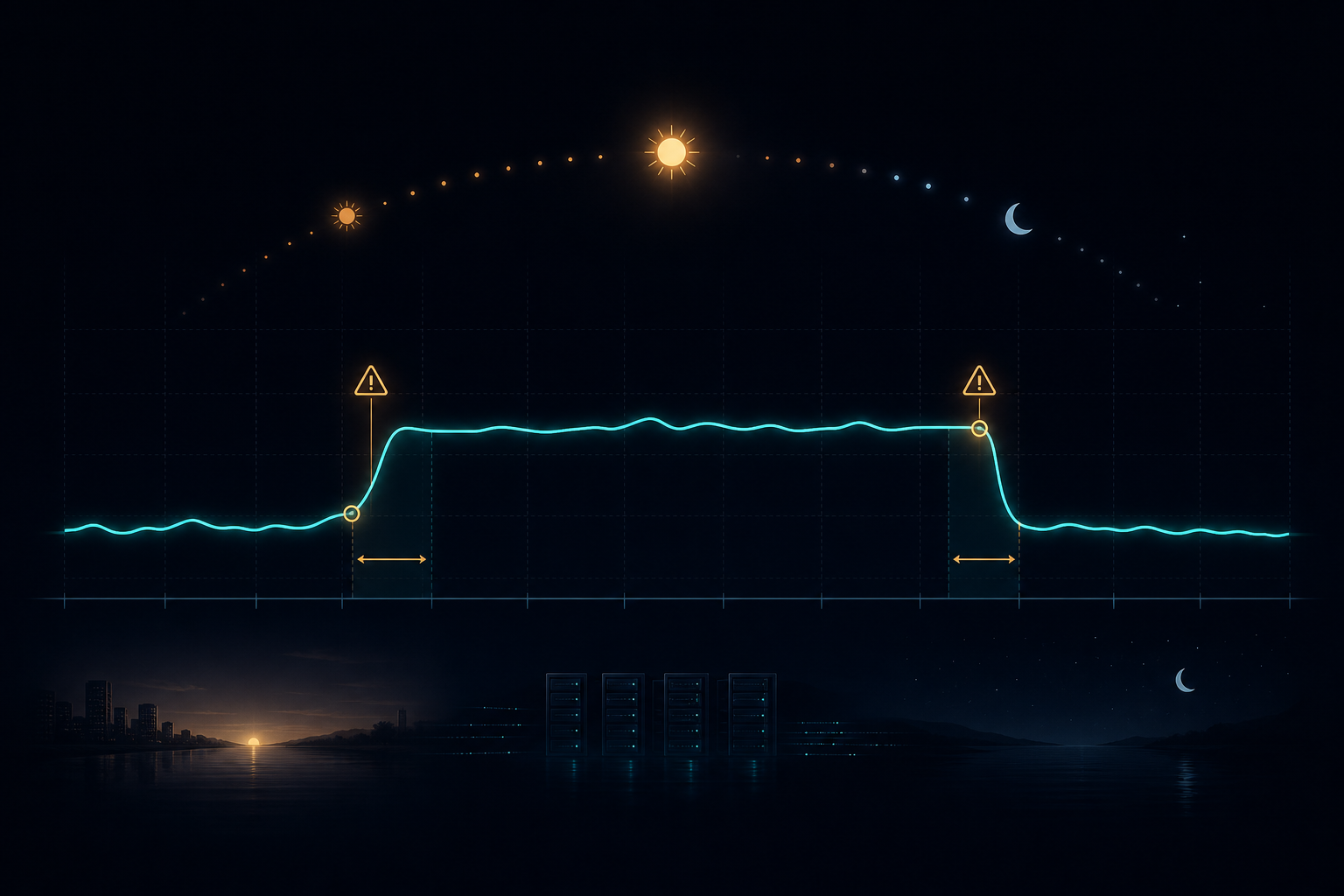
Daylight saving is where “store UTC, show local” stops being optional and starts being load-bearing. A zone with DST means the offset to UTC is not constant — it changes twice a year. If your code treats the offset as a fixed -05:00, you are 60 minutes wrong for half the year.
Landmine 1 — the “spring-forward hole”
When clocks spring forward, some local times do not exist. In the US on the second Sunday of March, the clock jumps from 01:59 to 03:00. There is no 2:30 AM that day. If a user (or a bad server default) hands you “March 8, 2:30,” there is no UTC instant it maps to — you must have a policy (clamp to 3:00, or reject).
Landmine 2 — the “fall-back fold” (ambiguous times)
When clocks fall back, one hour happens twice. “November 1, 1:30” occurs at two different UTC instants (1:30 EDT and 1:30 EST). A local time alone is ambiguous; only the zone + a fold indicator disambiguates. The same failure, mirror image: the 23-hour day and the 25-hour day.
Landmine 3 — charts that span a DST boundary
This is the one that silently corrupts analytics. Imagine an hourly throughput line chart for a day. If you bucket by local hour, the spring-forward day only has 23 buckets and the fall-back day has 25 — your axis is a different width than every other day, and a naïve “hours since midnight” axis will stretch or compress the data at the transition. Worse, if you ever compute deltas with a fixed offset, a gap appears exactly where the DST jump happened and the line looks like a real outage.
Both Luxon and Intl handle the transitions correctly because they read the IANA rules; the bugs come from home-grown offset math. If you see a hand-rolled utc + 4h anywhere, that’s where the next incident is hiding.
See it running
The live demo
Everything in this article is a running Rails 7.2 app on MariaDB — a small CRUD with the UTC-storing, local-displaying datetime widget, the dual local/UTC clock in the header, and the timezone-mismatch warning. Create a record, pick a time, reload the edit page, and watch the value survive the round trip in your own zone.
Coming live — https://demo01.grokonet.com
When it goes live, demo01.grokonet.com reverse-proxies (nginx) to the app on port 8093. Until then, on the demo host it is served host-only at:
Things to try
- Open the header — note the Local clock with your zone abbreviation next to the UTC clock.
- Create a record; read the preview line showing the local reading and the UTC value that gets stored.
- Edit it — the picker prefills in your zone; the DB still holds UTC.
- Change your OS time zone (or run it through a VPN) and come back — the amber timezone-mismatch banner should fire when the two disagree.
Related
This article was written for grokonet.com. A companion interactive index lives at grokonet.com.