1. Introduction
The Ruby on Rails asset pipeline has undergone one of the most significant architectural shifts in the framework's history. For over a decade, Sprockets was the unquestioned default for managing JavaScript, CSS, and other static assets. Starting with Rails 7, and culminating in Rails 7.2, the framework has embraced a modular ecosystem of modern tools that offer dramatically better performance, developer experience, and alignment with contemporary front-end engineering practices.
1.1 What Is an Asset Pipeline?
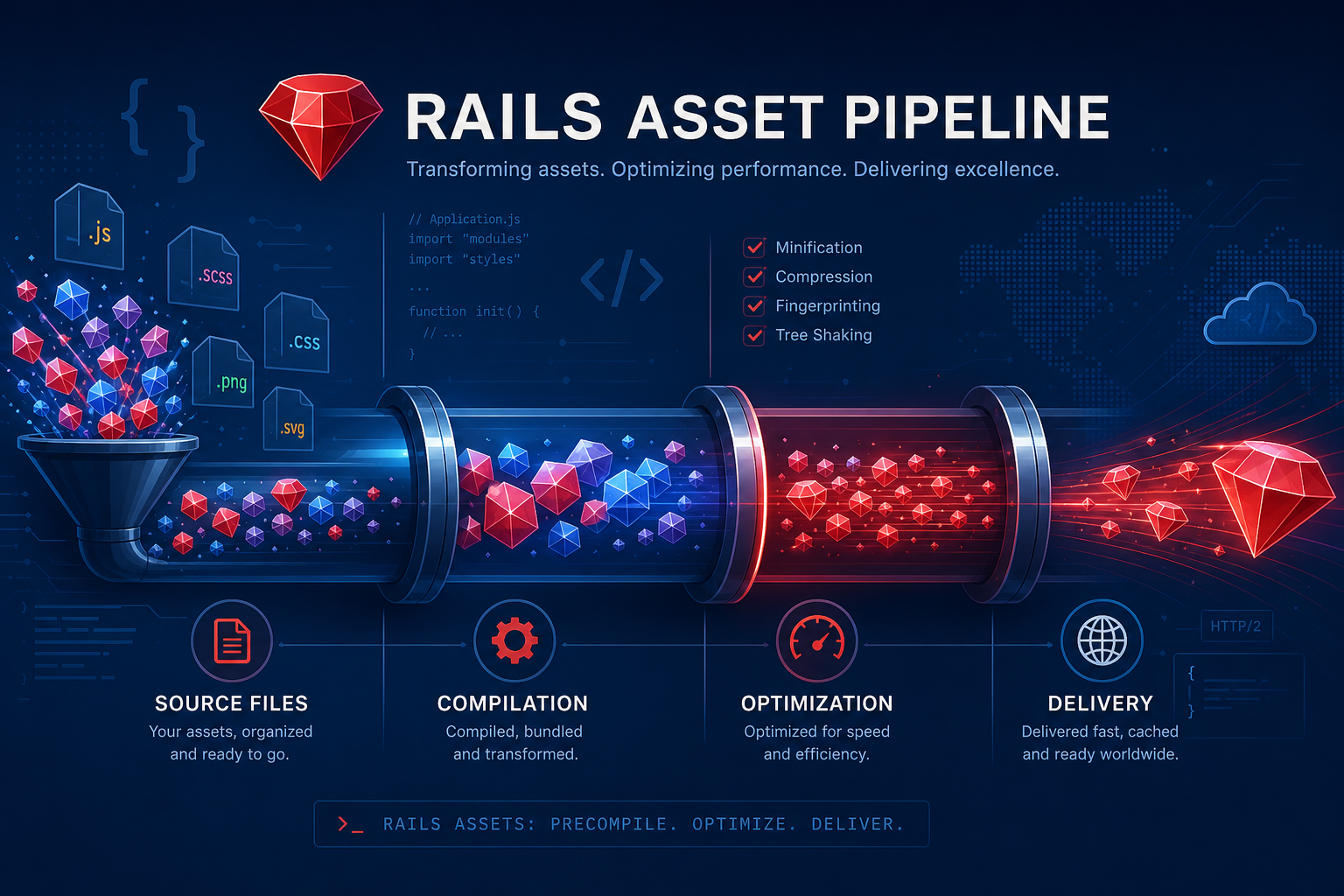
An asset pipeline is the system responsible for transforming, optimizing, and delivering static files—JavaScript, CSS, images, and fonts—from your source code to the browser. A well-designed pipeline handles:
- Compilation — Converting preprocessed languages (SCSS, CoffeeScript, TypeScript) into browser-compatible output.
- Concatenation — Combining multiple files into fewer, larger bundles to reduce HTTP requests.
- Minification — Removing whitespace and shortening variable names to reduce file size.
- Fingerprinting — Appending content-based hashes to filenames for cache invalidation.
- Resolution — Mapping import/require paths to actual file locations.
- Delivery — Serving the final assets to the browser or CDN.
1.2 Evolution of Rails Asset Management
Rails' approach to assets has evolved through four distinct phases:
- Pre-3.0 (2004–2010): Manual management. Developers placed files in
public/javascriptsandpublic/stylesheetsand linked them manually. - Rails 3–6 (2010–2019): Sprockets era. The pipeline was built in, handling compilation, concatenation, and fingerprinting automatically.
- Rails 7 (2021–2023): Modular era. Import Maps, Stimulus, and Propshaft introduced. Sprockets remained as a fallback.
- Rails 7.1–7.2 (2023–present): Post-Sprockets era. Propshaft is the default asset resolver. jsbundling-rails and cssbundling-rails are the recommended approaches for compiled assets.
Why the Change?
The front-end ecosystem moved far beyond what Sprockets was designed to handle. Modern JavaScript relies on ES modules, tree-shaking, and the npm ecosystem—none of which Sprockets natively supported. Rails adapted by delegating asset compilation to purpose-built tools while maintaining its convention-over-configuration philosophy.
2. The Sprockets Era (Rails 3–7)
Sprockets, created by the legendary CarrierWave, was introduced in Rails 3.1 and became the backbone of Rails' approach to static assets for nearly a decade. It was revolutionary for its time—providing automatic asset processing with minimal configuration.
2.1 Architecture
Sprockets operates as a Ruby-based preprocessor pipeline. When Rails boots in development, it registers the asset paths (app/assets/javascripts, app/assets/stylesheets, vendor/assets, and lib/assets) and monitors them for changes. On each request, it resolves dependencies, runs processors, and serves the result.
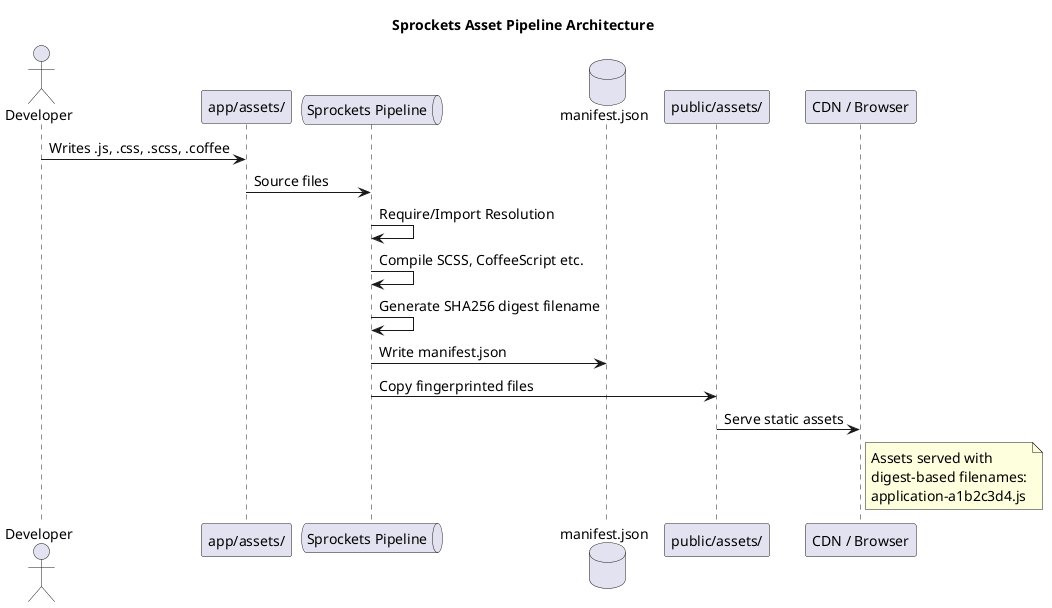
The core Sprockets architecture consists of several layers:
- Path Resolution: Sprockets maintains a source path stack. When it encounters a
requiredirective, it searches each path in order until it finds a matching file. - Processor Chain: Each file type has an associated processor (e.g.,
SCSSProcessor,CoffeeScriptProcessor). Processors are chained based on file extensions. - Dependency Graph: Sprockets builds a directed acyclic graph (DAG) of file dependencies from
= requireand= require_treedirectives. - Cache Layer: Compiled assets are cached in
tmp/cache/assetsin development, and written topublic/assetsin production duringrails assets:precompile.
2.2 Directives and Features
Sprockets introduced its own directive syntax for managing dependencies:
// app/assets/javascripts/application.js
//= require rails-ujs
//= require activestorage
//= require_tree .
The key directives were:
| Directive | Description |
|---|---|
= require |
Include a specific file by logical name |
= require_tree . |
Include all JavaScript files in the current directory (alphabetically) |
= require_directory . |
Like require_tree but non-recursive |
= require_self |
Insert the current file's content at this point |
= stub |
Mark a file as available but not auto-loaded |
= link |
Include an external asset (e.g., from a gem) without copying |
Beyond directives, Sprockets provided built-in processors for:
- CSS/SCSS: Via
sass-railsgem, processing.scssfiles with SASS/SCSS syntax - CoffeeScript: Via
coffee-railsgem, compiling.coffeeto JavaScript - ERB templating: Files ending in
.erbwere processed through ERB before other processors - Image transforms: Via
image_optimor similar gems - Environment-specific manifests:
application-environment.jsfiles for conditional loading
2.3 Digest Fingerprinting
One of Sprockets' most important features was automatic cache-busting through content-based fingerprinting. When you ran rails assets:precompile, Sprockets would:
- Compile and concatenate each manifest file (e.g.,
application.js) - Compute a SHA256 digest of the resulting content
- Rename the output file with the digest (e.g.,
application-).js - Write a
manifest.jsonmapping original names to fingerprinted names
In your views, you used helpers that automatically resolved the correct fingerprinted filename:
<%# app/views/layouts/application.html.erb %>
<%= javascript_include_tag "application" %>
<%= stylesheet_link_tag "application" %>

<%# Renders as: %>
<script src="/assets/application-a1b2c3d4e5f6.js"></script>
<link rel="stylesheet" href="/assets/application-f6e5d4c3b2a1.css">
This meant that browsers could safely cache assets indefinitely—the URL changed whenever the content changed, so stale caches were impossible.
2.4 Strengths and Weaknesses
What Sprockets Did Well:
- Zero configuration: Rails 3.1+ worked out of the box with no setup required.
- Convention over configuration: The
app/assetsdirectory structure and manifest convention were intuitive. - Asset digests: Built-in cache busting was a significant improvement over query-string versioning.
- Shared asset ecosystem: Gems like
jquery-railsandturbolinkscould ship assets that were automatically available to consuming applications. - ERB in assets: The ability to use
.js.erband.css.erbfor server-side rendering of configuration was powerful.
Where Sprockets Fell Short:
- No ES modules: Sprockets used its own
= requiresyntax instead of standardimport/`export`, making it impossible to use the growing npm ecosystem directly. - No tree-shaking:
= require_tree .included everything, bloating bundles with unused code. - Slow precompilation: As applications grew,
assets:precompilecould take minutes, blocking CI/CD pipelines. - Memory-intensive: Each precompilation spun up Ruby processes for each processor chain, consuming significant RAM.
- No code splitting: All JavaScript went into one
application.jsfile; lazy loading required manual workarounds. - CoffeeScript dependency: Sprockets was tightly coupled to CoffeeScript, a language that most of the ecosystem abandoned.
- Gem asset loading problems: Loading assets from gems was fragile and often required vendor-copying workarounds.
The = require_tree . Anti-Pattern
One of the most common Sprockets mistakes was relying on = require_tree . to auto-include all files. This caused ordering bugs (files loaded alphabetically, not in dependency order), bloated bundles, and made it impossible to reason about what was included. Modern systems solve this with explicit imports and tree-shaking.
3. Why Upgrade Beyond Sprockets
3.1 Performance Bottlenecks
The performance gap between Sprockets and modern tooling is dramatic:
| Metric | Sprockets | ESBuild | Rollup |
|---|---|---|---|
| Precompile time (typical app) | 30–120 seconds | 1–5 seconds | 3–15 seconds |
| Output bundle size | Baseline | 30–60% smaller | 25–50% smaller |
| Incremental rebuilds | Full rebuild | Milliseconds | Seconds |
| Memory usage | High (Ruby processes) | Low (Go binary) | Moderate (Node.js) |
ESBuild, written in Go, achieves its speed through a highly optimized single-process architecture with parallel worker threads. This represents a 10–100x improvement over Sprockets for typical projects.
3.2 Ecosystem Fragmentation
The JavaScript ecosystem has fundamentally shifted:
- ES Modules are standard: All modern browsers support
import/`export`. Sprockets'= requiresyntax is non-standard and incompatible. - npm is the package manager: Over 2 million packages are on npm. Sprockets' gem-based asset distribution model cannot access this ecosystem.
- Tree-shaking is expected: Modern bundlers eliminate dead code at build time. Sprockets included everything unconditionally.
- TypeScript adoption: The majority of new JavaScript libraries are written in or transpiled from TypeScript. Sprockets had no TypeScript support.
3.3 Maintenance and Security
Sprockets is in maintenance mode. The gem receives minimal updates, and many of its dependencies (particularly CoffeeScript and the Sass Ruby binding) are deprecated or have known security issues:
- CoffeeScript: The original compiler (jscoffee) has end-of-life notices. The Ruby binding (
therubyracer) has been unmaintained since 2021. - Sass (Ruby): The Dart Sass migration is complete. The Ruby binding is deprecated and will eventually stop receiving updates.
- Sprockets 4.x: The current stable version has been in feature freeze since 2022.
Rails 7.2 Default: Propshaft
Rails 7.2 no longer includes Sprockets by default. New applications use Propshaft as the asset resolver, paired with either Import Maps or jsbundling-rails for JavaScript, and cssbundling-rails for CSS. Existing applications must explicitly add the sprockets gem to continue using it.
4. Propshaft: The New Default
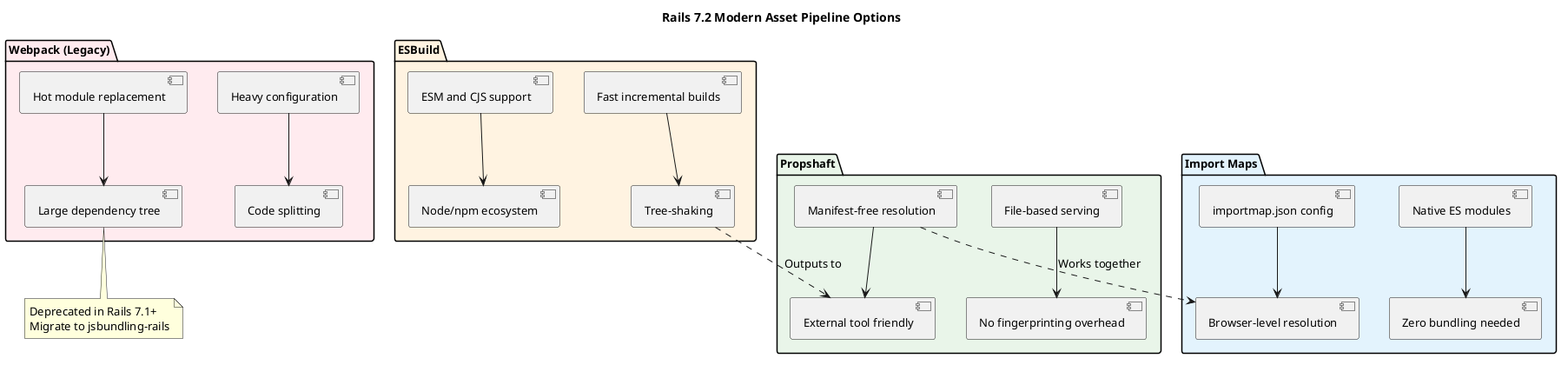
Propshaft, created by David Heinemeier Hansson (DHH) at 37signals, is Rails 7.2's default asset resolver. It takes a radically different approach from Sprockets: instead of compiling assets itself, Propshaft assumes that external tools (ESBuild, Rollup, etc.) have already done the compilation and simply manages serving and resolution.
4.1 Architecture
Propshaft's philosophy is minimalist:
- No compilation: Propshaft doesn't transform files. It serves them as-is.
- File-based resolution: Instead of a manifest.json mapping, Propshaft looks for files directly on the filesystem using configurable path patterns.
- Fingerprint detection: Propshaft detects whether a file has already been fingerprinted (by an external tool) and serves it directly without re-fingerprinting.
- Gem assets: Propshaft provides a clean mechanism for gems to ship precompiled assets that are automatically discoverable.
The key insight is that in the modern stack, compilation and serving are separate concerns. Propshaft handles serving elegantly while delegating compilation to tools that do it better (ESBuild, Rollup, Tailwind, etc.).
4.2 Features
- Asset tag helpers: Drop-in replacement for Sprockets'
javascript_include_tagandstylesheet_link_tag. - Source path configuration: Define where Propshaft looks for assets with glob patterns.
- Gem asset support: Gems ship their assets in
lib/assetsand Propshaft finds them automatically. - Precompiled detection: If a file like
application.jsexists in your output directory, Propshaft serves it directly without fingerprinting. - CDN integration: Works with the standard
config.assets.hostsetting for CDN prefixes.
4.3 Configuration
# config/initializers/propshaft.rb
Rails.application.config.assets do |config|
  # Where compiled assets live
  config.output_path = "app/assets/builds"

  # Source paths for uncompiled assets
  config.paths = [
    "app/assets/images",
    "app/assets/stylesheets",
  ]

  # CDN prefix (optional)
  # config.host = "https://cdn.example.com"

  # Fallback paths for gem assets
  config.fallback_paths = [
    "vendor/whatever",
  ]
end
Notice how much simpler this is compared to Sprockets' configuration. Propshaft has fewer moving parts because it delegates compilation to other tools.
5. Import Maps: Zero-Bundle JavaScript
Import Maps are a browser-native feature that allows you to define module specifier mappings directly in your HTML, eliminating the need for a JavaScript bundler entirely for many use cases. Rails 7+ provides the importmap-rails gem with first-class support.
5.1 How It Works
The Import Maps specification (now a W3C standard) lets you write:
<script type="importmap">
{
  "imports": {
    "stimulus": "https://cdn.jsdelivr.net/npm/@hotwired/stimulus@3.2.2/dist/stimulus.js",
    "@hotwired/turbo": "https://cdn.jsdelivr.net/npm/@hotwired/turbo@7.3.0/dist/turbo.es2017-esm.js",
    "controllers/": "/assets/controllers/"
  }
}
</script>
Then in your application entry point:
// app/javascript/application.js
import { application } from "controllers/index"
import { Turbo } from "@hotwired/turbo-rails"

// Now use standard ES module imports
application.start()
The browser resolves these imports directly—no bundler, no build step, no node_modules. For applications using the Hotwire stack (Turbo + Stimulus), this is often all the JavaScript tooling you need.
5.2 Configuration
# Gemfile
gem "importmap-rails"

# Install
bin/rails importmap:install

# Pin a package (fetches the CDN URL)
bin/importmap pin stimulus

# Generates an entry in config/importmap.rb
pin "stimulus", to: "@hotwired--stimulus.js" # @3.2.2
The pin command downloads the package to public/assets and records the mapping. Rails' view helpers then generate the correct <script type="importmap"> tag in your layout.
5.3 Limitations
Import Maps are powerful but not universal:
- ESM-only: Every dependency must be published as an ES module. CommonJS packages (still the majority on npm) won't work directly.
- No transpilation: You can't use TypeScript, JSX, or newer JavaScript syntax without a separate build step.
- No code splitting: All modules are loaded as separate network requests; there's no bundle optimization.
- Browser support: Import Maps are supported in all modern browsers but not in Safari 15 or older. A polyfill is available.
- CDN dependency: Import Maps typically point to CDN URLs, which introduces a runtime network dependency.
When to Choose Import Maps
If your application uses the Hotwire stack, has relatively simple JavaScript requirements, and doesn't need a build step, Import Maps are the simplest and fastest option. They're ideal for CRUD applications, dashboards, and content management systems where the UI is primarily server-rendered with light interactivity.
6. jsbundling-rails: ESBuild, Rollup, and Webpack
For applications that need full bundling capabilities, jsbundling-rails provides a thin Rails wrapper around popular Node.js bundlers. It integrates the build step into the Rails development workflow via the bin/dev command and provides rake tasks for production precompilation.
6.1 ESBuild (Recommended)
ESBuild is the recommended bundler for new Rails 7.2 applications. Written in Go, it's 10–100x faster than JavaScript-based bundlers and produces significantly smaller output bundles through aggressive tree-shaking.
# Install
./bin/bundle add jsbundling-rails
./bin/rails javascript:install:esbuild

# This creates:
#   package.json (with esbuild dependency)
#   app/javascript/application.js
#   esbuild.config.js
#   Procfile.dev (for bin/dev)

# Development (watch mode)
./bin/dev

# Production build
./bin/rails esbuild:build
The resulting esbuild.config.js is straightforward:
// esbuild.config.js
const esbuild = require("esbuild")

esbuild.build({
  entryPoints: ["app/javascript/application.js"],
  bundle: true,
  format: "esm",
  target: "es2020",
  outdir: "app/assets/builds",
  sourcemap: "linked",
  minify: process.env.RAILS_ENV === "production",
  plugins: [],
}).catch(() => process.exit(1))
Key ESBuild advantages:
- Speed: Builds that take minutes with Webpack complete in milliseconds.
- Zero config: Works out of the box with sensible defaults.
- Tree-shaking: Automatically eliminates unused exports.
- TypeScript support: Compiles TypeScript without additional configuration.
- Small binary: A single Go binary with no npm dependencies to manage.
6.2 Rollup
Rollup is an alternative that excels at library bundling and aggressive tree-shaking. It's particularly popular for projects that need fine-grained control over the bundling process or that produce distributable packages.
./bin/rails javascript:install:rollupRollup is slower than ESBuild but offers a rich plugin ecosystem and more granular configuration. It's a good choice when you need specific transformations that ESBuild's plugin ecosystem doesn't yet cover.
6.3 Webpack (Legacy)
Webpack was the default choice in Rails 6 via Webpacker. It remains functional through jsbundling-rails but is no longer recommended:
./bin/rails javascript:install:webpackWebpack's complexity is well-documented. It requires extensive configuration, has a large dependency tree, and produces slower build times compared to ESBuild and Rollup. Only choose Webpack if you have an existing Webpack configuration you need to maintain or if you depend on Webpack-specific plugins.
Webpacker Is Deprecated
The webpacker gem has been deprecated since Rails 7.1. If you're still using Webpacker, migrate to jsbundling-rails + Webpack or, preferably, switch to ESBuild.
7. CSS Processing: From Sass to PostCSS
Alongside JavaScript bundling, Rails 7.2 provides cssbundling-rails for CSS preprocessing. This replaces the Sprockets-era sass-rails gem.
7.1 Tailwind CSS
Tailwind CSS is the most popular choice for new Rails applications:
./bin/bundle add cssbundling-rails
./bin/rails css:install:tailwind
This sets up Tailwind with PostCSS, generates tailwind.config.js, and configures the build pipeline. Tailwind's utility-first approach works exceptionally well with Rails' server-side rendering, and the JIT compiler makes development fast.
7.2 PostCSS
For applications that don't want Tailwind's opinionated approach, PostCSS with plugins like postcss-preset-env provides modern CSS features with fallbacks:
./bin/rails css:install:postcssPostCSS allows you to use future CSS syntax (nesting, custom properties, container queries) and automatically compile them to browser-compatible output.
8. Side-by-Side Comparison
| Feature | Sprockets | Propshaft + Import Maps | Propshaft + ESBuild |
|---|---|---|---|
| Build step | Yes (Ruby) | No | Yes (Go) |
| Asset serving | Built-in | Built-in | Built-in |
| ES modules | No | Yes (native) | Yes |
| Tree-shaking | No | Browser-level | Build-time |
| TypeScript | No | No | Yes |
| npm packages | Indirect (gems) | CDN only | Full npm access |
| Code splitting | No | Manual | Yes (dynamic import) |
| Build speed | Slow (30–120s) | Instant | Fast (1–5s) |
| Bundle size | Large | Medium | Small (tree-shaken) |
| Complexity | Low | Lowest | Low |
| Production readiness | Maintenance mode | Recommended | Recommended |
9. Migration Guide
9.1 Assessing Your Application
Before migrating, evaluate your application's asset complexity. Not all applications need the same approach.
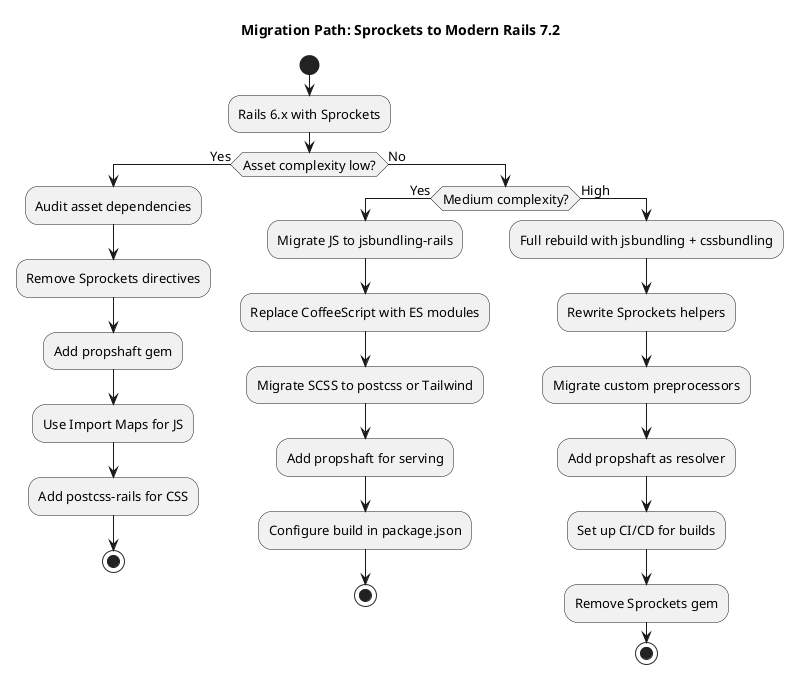
Low complexity — Your application uses mostly vanilla JavaScript, a few gems, and standard SCSS. Consider Import Maps + Propshaft + PostCSS.
Medium complexity — You have a mix of npm packages, custom JavaScript modules, and some SCSS. Consider ESBuild + Propshaft + Tailwind.
High complexity — You have a large JavaScript application with code splitting, TypeScript, and custom build requirements. Consider ESBuild or Rollup + Propshaft + Tailwind.
9.2 Step-by-Step Migration
Phase 1: Preparation
- Audit your current asset dependencies — list all gems that ship assets
- Identify all
= requiredirectives and map them to ES module imports - Check for CoffeeScript files — these must be converted to JavaScript
- Check for ERB in assets (
.js.erb,.css.erb) — these need alternative approaches
Phase 2: JavaScript Migration
- Install jsbundling-rails or importmap-rails
- Convert
= require "library"toimport library from "library" - Replace CoffeeScript files with JavaScript or TypeScript equivalents
- Update view helpers from
javascript_include_tagto the new system's helpers - Test all JavaScript functionality
Phase 3: CSS Migration
- Install cssbundling-rails
- Choose Tailwind or PostCSS
- Migrate SASS syntax to standard CSS or PostCSS-compatible syntax
- Replace Sprockets
@importdirectives with the new system's equivalents
Phase 4: Asset Serving
- Add Propshaft to your Gemfile
- Configure source paths in
config/initializers/propshaft.rb - Remove Sprockets and related gems (sass-rails, coffee-rails, uglifier)
- Update your CI/CD pipeline to run the new build commands
- Run
rails assets:precompileto verify production builds
9.3 Common Pitfalls
- Asset gem compatibility: Some gems still expect Sprockets. You may need to add
gem "sprockets"temporarily or switch to gems that support Propshaft. - ERB in JavaScript:
.js.erbfiles don't work with ESBuild. Replace with JSON configuration files loaded at runtime or environment variable injection. - CoffeeScript conversion: There's no automatic CoffeeScript-to-JavaScript converter that handles all cases. Budget time for manual migration.
- Asset path changes: Propshaft uses different path conventions. Update hardcoded asset references.
- Missing manifest entries: In Sprockets, files were auto-discovered. With Propshaft + ESBuild, you must explicitly import everything.
- Precompile failures in CI: The new build step requires Node.js/npm in your CI environment. Ensure your CI images include these dependencies.
Testing During Migration
Don't attempt a full migration in one pass. Migrate one section of your application at a time, testing thoroughly between phases. The javascript_include_tag helper works with both Sprockets and Propshaft, so you can run both systems in parallel during migration.
10. Conclusion
The transition from Sprockets to the modern Rails 7.2 asset pipeline represents more than a tool swap—it's a philosophical shift from a monolithic, Ruby-centric approach to a modular, ecosystem-aware architecture. The benefits are substantial:
- 10–100x faster builds with ESBuild's Go-based compiler
- 30–60% smaller bundles through tree-shaking and modern optimization
- Full npm ecosystem access with standard ES module imports
- Cleaner separation of concerns between compilation (ESBuild/Rollup) and serving (Propshaft)
- Better alignment with the broader JavaScript ecosystem
The migration effort is proportional to your application's complexity. Simple applications can migrate in a weekend. Complex applications should plan for a phased approach over several sprints. In all cases, the investment pays dividends in build speed, bundle size, and long-term maintainability.
Rails 7.2's default stack—Propshaft for serving, your choice of Import Maps or ESBuild for JavaScript, and Tailwind or PostCSS for CSS—gives you the best of both worlds: Rails' convention-over-configuration philosophy paired with the performance and flexibility of modern front-end tooling.