Real-Time Ruby
ActionCable in Rails 7.2 — WebSockets, C++ Workers, and Live Dashboards
ActionCable is Rails' built-in framework for real-time, bidirectional communication between a browser and a Rails server over WebSockets. It was introduced in Rails 5.0 and has been refined through every release since. In Rails 7.2, ActionCable integrates seamlessly with modern asset pipelines (Import Maps, Esbuild, or Propshaft), supports connection streaming for fan-out scenarios, and works cleanly with the new config.ru boot process.
Unlike HTTP — which requires the client to poll for updates — WebSockets keep a single TCP connection open. The server can push data to the client at any time. This makes ActionCable ideal for:
ActionCable provides a convention-over-configuration structure:
app/channels/application_cable/connection.rb — authentication and WebSocket handshakeapp/channels/application_cable/channel.rb — base channel classapp/channels/*.rb — individual channel classes with subscribed, received, and broadcast handlersapp/javascript/channels/consumer.js — the JavaScript entry pointapp/javascript/channels/index.js — auto-imports all channel consumersWhen a user opens a page that uses ActionCable, the following components interact:
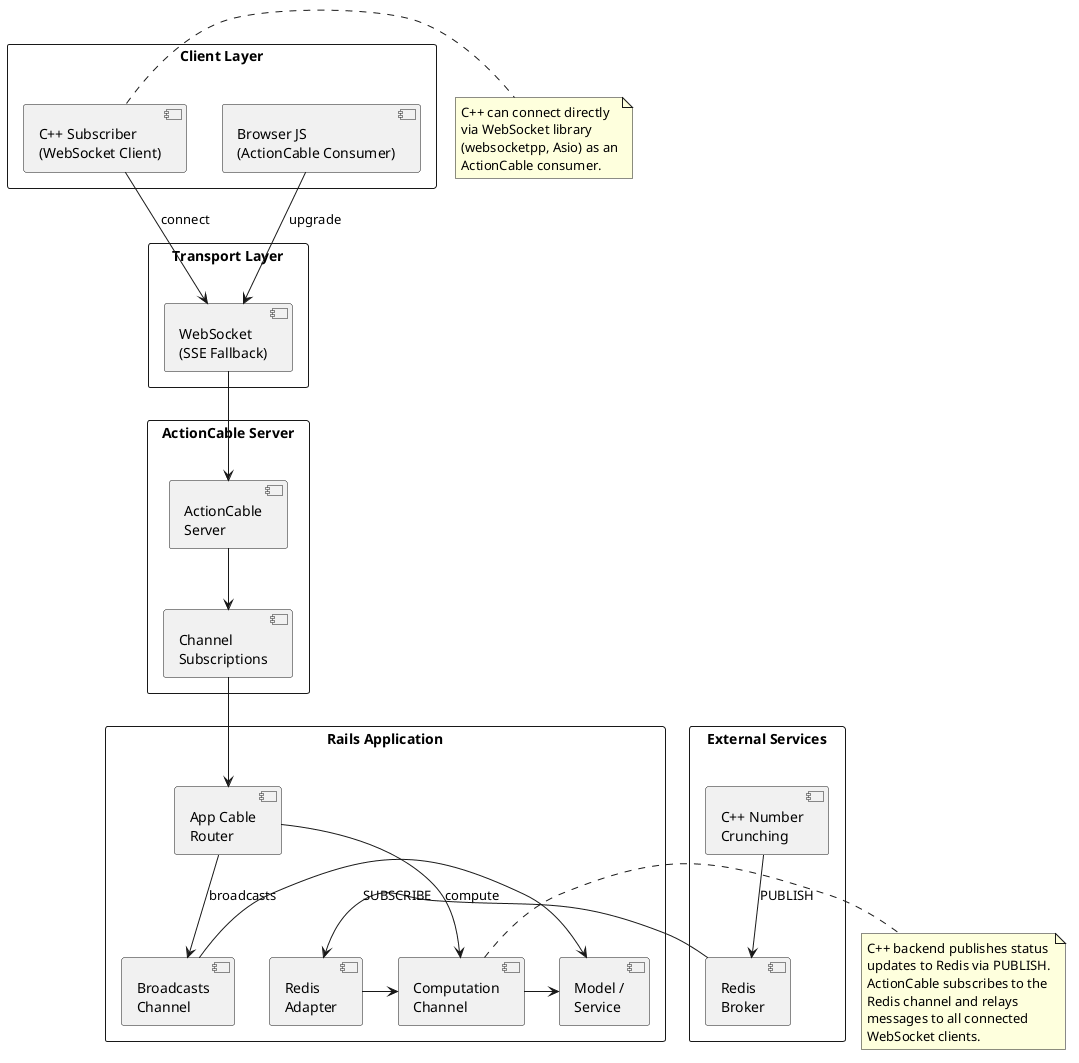
The flow works in four layers:
/cable. The browser's JavaScript consumer maintains this connection.ApplicationCable::Connection authenticates the connection. If it calls reject_unauthorized_connection, the handshake fails. Otherwise, instance variables set here become available to all channels.subscribed callback (entry), a received callback (client → server data), and can stream_from broadcast queues.inline (or async) adapter delivers in-process. The redis adapter uses Redis Pub/Sub so multiple Rails processes and external clients (like C++ programs) can participate.The WebSocket handshake follows the RFC 6455 protocol:
GET /cable with Upgrade: websocket and Sec-WebSocket-Key headers.actioncable gem, mounted in the Rails router) intercepts this request.Connection class runs. It has access to cookies, request, and env — the same as a controller — so you can authenticate using cookies.signed[:user_id], JWT tokens, or session data.101 Switching Protocols and the TCP connection is upgraded to a full-duplex WebSocket.If the WebSocket drops, the JavaScript client automatically attempts reconnection with exponential backoff. The connection is re-authenticated on each reconnection attempt.
Channels are the logical grouping mechanism in ActionCable. Think of them as named topics. A client can subscribe to multiple channels simultaneously:
// Client subscribes to a channel with parameters
App.cable.subscriptions.create(
  { channel: "ComputationChannel", job_id: "abc123" },
  {
    received(data) { console.log(data.progress); },
    start() { this.perform("start"); },
  }
);
On the server side, the channel class handles the subscription:
class ComputationChannel < ApplicationCable::Channel
  def subscribed
    stream_from "computation_#{params[:job_id]}"
  end

  def unsubscribed
    # stop any background work tied to this subscription
  end

  def start
    # spawn the C++ worker; it will publish to the broadcast queue
    ComputationJob.perform_async(id: params[:job_id])
  end
end
The stream_from call tells ActionCable: "whenever someone broadcasts to this queue name, forward the message to this subscriber." Multiple subscribers can stream_from the same queue, enabling one-to-many fan-out.
ActionCable abstracts the broadcast delivery mechanism behind an adapter interface. The choice of adapter determines whether broadcasts stay in-process or go through an external message broker:
| Adapter | Delivery | Use Case | External Clients? |
|---|---|---|---|
inline |
Synchronous, same thread | Testing | No |
async |
Background thread (Ruby queue) | Single-process development | No |
solid_cable |
Database-polling (PostgreSQL/MySQL) | No-Redis deployments | No |
redis |
Redis Pub/Sub | Production, multi-process | Yes |
postcastle |
PostgreSQL LISTEN/NOTIFY | PostgreSQL-only stacks | Limited |
For our tutorial, we use the Redis adapter — because it's the only adapter that lets an external C++ program publish messages that Rails will forward to connected browsers.
Rails 7.2 brings several refinements to ActionCable:
In Rails 7.x, you have three asset pipeline options for the JavaScript side of ActionCable:
rails new) — uses importmap.rb to pin @rails/actioncable to a CDN. No build step required.app/javascript. ActionCable is installed as an npm package.With Import Maps (the default), you add ActionCable to config/importmap.rb:
pin "@rails/actioncable", to: "actioncable.esm.js"
pin "channels", to: "channels/index.js"
Then in app/javascript/application.js:
import "@rails/actioncable"
import "./channels"
With Esbuild, install via npm:
bin/dev
# In another terminal:
npm install @rails/actioncable
Rails 7.2's connection handler has full access to the signed cookie jar. The recommended pattern for authenticated WebSocket connections:
class ApplicationCable::Connection < ActionCable::Connection::Base
  identified_by :current_user

  def connect
    self.current_user = find_verified_user
  end

  private

  def find_verified_user
    if verified_user = User.find_by(id: cookies.signed[:user_id])
      verified_user
    else
      reject_unauthorized_connection
    end
  end
end
The identified_by declaration creates an identifier that channels can reference. In any channel:
def subscribed
  return reject unless current_user # available from Connection
  stream_from "user_#{current_user.id}_notifications"
end
Rails 5 introduced Host Authorization (tightened further in 7.x and 7.2): a Rack middleware, ActionDispatch::HostAuthorization, that runs before any request is routed — including ActionCable WebSocket upgrades. It extracts request.host (the value of the Host header, port excluded) and compares it against the whitelist in config.hosts. Hosts that are not whitelisted are rejected immediately with a "Blocked hosts" page (a 422 or 500, depending on the Rails version), so a WebSocket handshake from an unknown host simply never reaches your channels.
# config/environments/production.rb
config.hosts = ["rms.grokonet.com", "www.rms.grokonet.com"]

# Matching rules:
#   "rms.grokonet.com"   exact match
#   ".grokonet.com"      matches the domain AND every subdomain
#   "*"                  matches everything — never use in production
Host authorization and the connection-level authentication in 3.2 are complementary: config.hosts filters requests at the middleware level before routing, while identified_by / reject_unauthorized_connection filter individual WebSocket sessions inside the Connection class.
config.cable.allowed_request_origins performs the same whitelist check, but on the WebSocket Origin header rather than the Host header. It is the ActionCable-specific guard against cross-origin WebSocket hijacking:
# config/initializers/cable_origins.rb
Rails.application.configure do
  config.cable.allowed_request_origins = [/https?:\/\/rms\.grokonet\.com/]
endThis paper's architecture has two legitimate clients hitting the same app: a C++ worker container on the Docker network and browsers reaching the app through a reverse proxy. Both need to be whitelisted, and each has a slightly different Host header.
Pattern A — Docker service name (recommended). Whitelist the service name only, and drop the port from the C++ client's URL:
# config/environments/development.rb  (and the equivalent in production)
config.hosts << "rails"                       # Docker service name
config.hosts << ".rms.grokonet.com"           # public domain for the browser

# C++ client — no :3000 in the URL:
std::string url = "http://rails/rms/progress_updates";
// Docker DNS resolves "rails" to the container's IP on the default port 3000
Only containers that can resolve the rails name — i.e., containers on the same Docker network — can forge that host header, which keeps the internal surface bounded. When the client connects to http://rails/... (port-less), the Host header is exactly rails.
Pattern B — explicit port. If the client cannot drop the port from the URL, whitelist the exact host+port string it sends:
config.hosts << "rails:3000"Same security envelope as Pattern A, just a more specific match string.
Pattern C — sidecar reverse proxy. For IP-level precision, front the app with a small Nginx sidecar that rewrites the Host header and insert your ACLs there (rate limiting, mutual TLS, allow-listed source IPs). The Rails app then whitelists only the host the sidecar forwards.
config.hosts << "rails") and the public domain for browser traffic.config.cable.allowed_request_origins so only your own pages can open the WebSocket, even if the Host header is allowed.Host header cannot be spoofed on the wire.before_action asserting request.remote_ip is in the internal subnet) for the C++ endpoint.config.hosts is read at boot time.In this tutorial, we'll build a complete real-time system:
hiredis library.
rails new computation_dashboard --css=tailwind
cd computation_dashboard

# ActionCable files are generated by default in Rails 7.2,
# but let's verify they exist:
ls app/channels/application_cable/
# connection.rb
# channel.rb
# config/cable.yml
development:
  adapter: redis
  url: redis://localhost:6379/1

production:
  adapter: redis
  url: <%= ENV["REDIS_URL"] %>
  channel_prefix: computation_dashboard_production
# Gemfile
gem "redis", "~> 5.0"

bundle install
# app/channels/application_cable/connection.rb
module ApplicationCable
  class Connection < ActionCable::Connection::Base
    # For this tutorial we allow open connections.
    # In production, authenticate as shown in Section 3.2.
    def connect
      # self.current_user = find_verified_user
      logger.add_tags "ActionCable", "RemoteAddr: #{request.remote_ip}"
    end
  end
end
# app/channels/computation_channel.rb
class ComputationChannel < ApplicationCable::Channel
  def subscribed
    # Stream from a Redis channel named "computation:#{params[:job_id]}"
    stream_from "computation:#{params[:job_id]}"

    # If the client asks us to start on subscription:
    if params[:start] == "true"
      ComputationWorker.spawn(params[:job_id])
    end
  end

  def unsubscribed
    # cleanup if needed
  end

  def start(data)
    job_id = data["job_id"] || SecureRandom.hex(8)
    ComputationWorker.spawn(job_id)
    transmit(status: "started", job_id: job_id)
  end
end
# app/workers/computation_worker.rb
class ComputationWorker
  REDIS_BIN = "/usr/local/bin/redis-cli"

  def self.spawn(job_id)
    # Launch the C++ binary in the background.
    # It connects to Redis and publishes progress updates.
    binary = Rails.root.join("bin", "compute_pi").to_s

    unless File.exist?(binary)
      $stderr.puts "ERROR: #{binary} not found. Run 'make' first."
      return
    end

    pid = Process.spawn(
      binary,
      job_id.to_s,
      err: Rails.root.join("log", "compute_stderr.log"),
      out: Rails.root.join("log", "compute_stdout.log")
    )

    Rails.logger.info "Spawned C++ worker PID=#{pid} for job #{job_id}"
  end
end
Our C++ program will compute π using the Monte Carlo method. It connects to Redis using the hiredis library and publishes progress updates at regular intervals.
# Install hiredis (on Debian/Ubuntu):
sudo apt-get install libhiredis-dev

# Or build from source:
git clone https://github.com/redis/hiredis.git
cd hiredis && make && sudo make install
// src/compute_pi.cpp
#include <iostream>
#include <random>
#include <string>
#include <chrono>
#include <thread>
#include <cstring>
#include <hiredis/hiredis.h>
#include <json/json.h> // or use nlohmann/json

// Simple JSON builder to avoid heavy dependencies
std::string make_json(const std::string &status, int iterations,
                      double estimate, double elapsed) {
  return "{\"status\":\"" + status +
         "\",\"iterations\":" + std::to_string(iterations) +
         ",\"estimate\":" + std::to_string(estimate) +
         ",\"elapsed\":" + std::to_string(elapsed) + "}";
}

int main(int argc, char* argv[]) {
  if (argc != 2) {
    std::cerr << "Usage: " << argv[0] << " <job_id>" << std::endl;
    return 1;
  }
  std::string job_id = argv[1];
  std::string redis_channel = "computation:" + job_id;

  // Connect to Redis
  redisContext* ctx = redisConnect("127.0.0.1", 6379);
  if (ctx == nullptr || ctx->err) {
    std::cerr << "Cannot connect to Redis: "
              << (ctx ? ctx->errstr : "out of memory") << std::endl;
    if (ctx) redisFree(ctx);
    return 1;
  }
  std::cout << "Connected to Redis. Publishing to "
            << redis_channel << std::endl;

  // Monte Carlo pi estimation
  const int total_batches = 100;
  const int batch_size = 1000000; // 1 million samples per batch
  std::mt19937_64 rng(42);
  std::uniform_real_distribution<double> dist(0.0, 1.0);

  auto start_time = std::chrono::steady_clock::now();
  int inside_circle = 0;

  for (int batch = 0; batch < total_batches; ++batch) {
    for (int i = 0; i < batch_size; ++i) {
      double x = dist(rng);
      double y = dist(rng);
      if (x * x + y * y <= 1.0) {
        inside_circle++;
      }
    }

    auto now = std::chrono::steady_clock::now();
    double elapsed = std::chrono::duration<double>(now - start_time).count();
    int total_samples = (batch + 1) * batch_size;
    double pi_estimate = 4.0 * inside_circle / total_samples;
    int progress_pct = (batch + 1) * 100 / total_batches;

    // Publish progress to Redis
    std::string payload = make_json(
      "progress",
      total_samples,
      pi_estimate,
      elapsed
    );

    redisReply* reply = (redisReply*)redisCommand(ctx,
      "PUBLISH %s %s", redis_channel.c_str(), payload.c_str());
    if (reply) freeReplyObject(reply);

    std::cout << "Batch " << (batch + 1) << "/" << total_batches
              << " — π ≈ " << pi_estimate
              << " (" << progress_pct << "%)" << std::endl;

    // Small delay so the browser can render updates
    std::this_thread::sleep_for(std::chrono::milliseconds(200));
  }

  // Publish final result
  auto end_time = std::chrono::steady_clock::now();
  double total_elapsed = std::chrono::duration<double>(end_time - start_time).count();
  double final_estimate = 4.0 * inside_circle / (total_batches * batch_size);

  std::string final_payload = make_json(
    "complete",
    total_batches * batch_size,
    final_estimate,
    total_elapsed
  );

  redisReply* reply = (redisReply*)redisCommand(ctx,
    "PUBLISH %s %s", redis_channel.c_str(), final_payload.c_str());
  if (reply) freeReplyObject(reply);

  std::cout << "Done! Final π ≈ " << final_estimate
            << " in " << total_elapsed << "s" << std::endl;

  redisFree(ctx);
  return 0;
}
# Makefile
CXX = g++
CXXFLAGS = -std=c++17 -O2 -pthread
LDFLAGS = -lhiredis

bin/compute_pi: src/compute_pi.cpp
  @mkdir -p bin
  $(CXX) $(CXXFLAGS) -o $@ $< $(LDFLAGS)

clean:
  rm -f bin/compute_pi
make
# Builds bin/compute_pi
// app/javascript/channels/consumer.js
import { createConsumer } from "@rails/actioncable"

export default createConsumer()
// app/javascript/channels/index.js
import consumer from "./consumer"
import ComputationChannel from "./computation_channel"

// Register the channel
consumer.subscriptions.create(
  { channel: "ComputationChannel", start: "true", job_id: "default" },
  ComputationChannel
)
// app/javascript/channels/computation_channel.js
export default {
  connected() {
    console.log("Connected to ComputationChannel");
    this.updateUI("connected", "Waiting for computation to start...");
  },

  disconnected() {
    this.updateUI("disconnected", "Disconnected from server");
  },

  received(data) {
    console.log("Received:", data);
    if (data.status === "started") {
      this.updateUI("running", `Job ${data.job_id} started`);
    } else if (data.status === "progress") {
      this.updateProgress(data);
    } else if (data.status === "complete") {
      this.updateComplete(data);
    }
  },

  // ---- UI update helpers ----
  updateUI(state, message) {
    const el = document.getElementById("status");
    if (el) {
      el.className = `status ${state}`;
      el.textContent = message;
    }
  },

  updateProgress(data) {
    const progressEl = document.getElementById("progress-bar");
    const estimateEl = document.getElementById("pi-estimate");
    const elapsedEl = document.getElementById("elapsed");
    const samplesEl = document.getElementById("samples");

    if (progressEl) {
      const pct = Math.round((data.iterations / 100000000) * 100);
      progressEl.style.width = `${pct}%`;
      progressEl.textContent = `${pct}%`;
    }
    if (estimateEl) estimateEl.textContent = data.estimate.toFixed(8);
    if (elapsedEl) elapsedEl.textContent = `${data.elapsed.toFixed(1)}s`;
    if (samplesEl) samplesEl.textContent = data.iterations.toLocaleString();
  },

  updateComplete(data) {
    this.updateUI("complete", `Computation finished!`);
    const progressEl = document.getElementById("progress-bar");
    if (progressEl) {
      progressEl.style.width = "100%";
      progressEl.textContent = "100%";
    }
    this.updateProgress(data);
  },
};
<%# app/views/computations/show.html.erb %>
<% content_for :title, "Live Computation Dashboard" %>

<div class="dashboard">
  <h1>Monte Carlo π Estimation</h1>

  <div id="status" class="status" style="padding:12px; margin-bottom:20px; border-radius:6px; background:#f0f0f0;">
    Connecting...
  </div>

  <div class="progress-container" style="background:#e0e0e0; border-radius:8px; height:32px; margin-bottom:24px; overflow:hidden;">
    <div id="progress-bar" style="width:0%; height:100%; background:linear-gradient(90deg, #cc342d, #f58220); color:#fff; text-align:center; line-height:32px; font-weight:bold; transition:width 0.3s;">
      0%
    </div>
  </div>

  <div class="metrics" style="display:grid; grid-template-columns:repeat(3,1fr); gap:16px;">
    <div style="background:#fff; padding:20px; border-radius:8px; border:1px solid #e0e0e0; text-align:center;">
      <div style="font-size:0.9em; color:#666;">π Estimate</div>
      <div id="pi-estimate" style="font-size:2em; font-weight:bold; color:#cc342d;">—</div>
    </div>
    <div style="background:#fff; padding:20px; border-radius:8px; border:1px solid #e0e0e0; text-align:center;">
      <div style="font-size:0.9em; color:#666;">Samples</div>
      <div id="samples" style="font-size:1.6em; font-weight:bold;">0</div>
    </div>
    <div style="background:#fff; padding:20px; border-radius:8px; border:1px solid #e0e0e0; text-align:center;">
      <div style="font-size:0.9em; color:#666;">Elapsed</div>
      <div id="elapsed" style="font-size:1.6em; font-weight:bold;">0.0s</div>
    </div>
  </div>
</div>
Here's how the Redis adapter makes the C++ → Rails → Browser bridge work:
redisCommand(ctx, "PUBLISH computation:abc123 {...}"). This sends a message to the Redis channel computation:abc123.ComputationChannel with job_id: "abc123", the channel called stream_from "computation:abc123". ActionCable's Redis adapter issued a SUBSCRIBE computation:abc123 to Redis.received(data) callback fires, and the UI updates.The key insight: the C++ program never talks to the browser directly. It publishes to Redis, and Rails acts as the relay. This means:
# config/routes.rb
Rails.application.routes.draw do
  root "computations#show"
end
# app/controllers/computations_controller.rb
class ComputationsController < ApplicationController
  def show
    # The page just loads — ActionCable handles the rest
  end
end
# Terminal 1 — Redis
redis-server --daemonize yes

# Terminal 2 — Rails server
rails server

# Terminal 3 — Build the C++ binary
make

# Now open http://localhost:3000
# The C++ worker starts automatically via the channel subscription
ComputationChannel.broadcast_to(
  "default",
  { status: "progress", iterations: 5000000, estimate: 3.14159, elapsed: 2.5 }
)
So far we've used C++ as a publisher — it sends data to Redis, and Rails relays it. But what if C++ needs to receive commands from the browser too? For that, C++ can connect directly to the ActionCable WebSocket endpoint.
ActionCable uses a custom message format over WebSocket. Commands are JSON objects with a command key:
| Command | Purpose | Example |
|---|---|---|
subscribe |
Subscribe to a channel | {"command":"subscribe","identifier":"{\"channel\":\"ComputationChannel\",\"job_id\":\"x\"}","callback":"message"} |
perform |
Call an action on a channel | {"command":"perform","identifier":"{...}","data":"{\"action\":\"start\"}"} |
unsubscribe |
Leave a channel | {"command":"unsubscribe","identifier":"{...}"} |
ping |
Keep-alive | {"command":"ping","message":"hello"} |
Responses from the server come as JSON with a type key:
| Type | Meaning |
|---|---|
confirm_subscription |
Channel subscription accepted |
reject_subscription |
Channel subscription denied |
message |
Data from a broadcast or transmit call |
ping |
Server keep-alive (reply with pong) |
disconnect |
Server closing the connection |
Using the websocketpp library (header-only, no compilation needed):
// src/cpp_cable_client.cpp
#include <iostream>
#include <string>
#include <websocketpp/config/asio_client.hpp>
#include <websocketpp/client.hpp>
#include <nlohmann/json.hpp>

using json = nlohmann::json;
using client = websocketpp::client<websocketpp::config::asio_client>;

class ActionCableClient {
  client m_ws;
  websocketpp::lib::shared_ptr<const client::connection> m_conn;
  std::string m_job_id;

public:
  ActionCableClient(const std::string &job_id)
    : m_job_id(job_id) {
    m_ws.init_asio();
    m_ws.set_access_channels(websocketpp::log::alevel::none);
    m_ws.set_error_channels(websocketpp::log::elevel::rerror);
  }

  void connect(const std::string &url = "ws://localhost:3000/cable") {
    m_ws.set_message_handler(
      bind(&ActionCableClient::on_message, this,
           websocketpp::lib::placeholders::_1,
           websocketpp::lib::placeholders::_2)
    );

    websocketpp::lib::error_code ec;
    m_conn = m_ws.get_connection(url, ec);
    m_ws.connect(m_conn);
    m_ws.run();
  }

private:
  void on_message(
    client* c,
    websocketpp::connection_handle,
    const client::message_ptr& msg)
  {
    try {
      json response = json::parse(msg->get_payload());
      std::string type = response.value("type", "");

      if (type == "confirm_subscription") {
        std::cout << "Subscribed to channel!" << std::endl;
        // Now start computing and publish via Redis
        run_computation();
      } else if (type == "message") {
        json data = response.value("data", json::object());
        std::string action = data.value("action", "");
        if (action == "start") {
          std::cout << "Browser said: start computing!" << std::endl;
          run_computation();
        }
      } else if (type == "ping") {
        // Respond with pong
        json pong = {{"command", "pong"}};
        c->send(pong.dump(), websocketpp::frame::opcode::text);
      }
    } catch (const std::exception &e) {
      std::cerr << "Parse error: " << e.what() << std::endl;
    }
  }

  void subscribe() {
    json identifier = {
      {"channel", "ComputationChannel"},
      {"job_id", m_job_id}
    };
    json cmd = {
      {"command", "subscribe"},
      {"identifier", identifier.dump()},
      {"callback", "message"}
    };
    m_conn->send(cmd.dump(), websocketpp::frame::opcode::text);
  }

  void perform_action(const std::string &action) {
    json identifier = {
      {"channel", "ComputationChannel"},
      {"job_id", m_job_id}
    };
    json data = {{"action", action}};
    json cmd = {
      {"command", "perform"},
      {"identifier", identifier.dump()},
      {"data", data.dump()}
    };
    m_conn->send(cmd.dump(), websocketpp::frame::opcode::text);
  }

  void run_computation() {
    // Same Monte Carlo computation as before,
    // publishing progress to Redis
    std::cout << "Starting computation..." << std::endl;
    // ... (Monte Carlo code here)
  }
};

int main() {
  std::string job_id = "cpp-direct";
  ActionCableClient client(job_id);
  client.connect("ws://localhost:3000/cable");
  return 0;
}
This C++ client:
ws://localhost:3000/cableComputationChannel using ActionCable's protocolconfirm_subscription from Railsperform actions from the browser via the channelThis creates a three-way communication pattern:
Puma's default thread pool and Puma workers determine how many WebSocket connections your Rails app can handle. Each WebSocket connection holds a thread while idle. Calculate:
max_connections = puma_workers × puma_threads
If you expect more simultaneous WebSocket connections than threads, you'll need to increase Puma's thread count or consider a dedicated ActionCable server process.
When a browser tab is closed, the WebSocket closes and ActionCable cleans up subscriptions. However, if the network drops without a proper close (e.g., laptop sleep), the connection may stay open until the TCP timeout. Use ActionCable's ping/pong mechanism (built-in) to detect dead connections:
# config/cable.yml — defaults are fine:
development:
  adapter: redis
  # ping_interval: 60 (seconds between pings)
  # max_wait_time: 300 (seconds before declaring a connection dead)
If a client's WebSocket send buffer fills up (e.g., the user's connection is very slow), ActionCable will eventually drop that subscriber from the broadcast queue. This prevents slow clients from blocking the entire system. Fast clients are unaffected.
Never trust the client. ActionCable channels should validate every received message. A malicious client can send arbitrary JSON through the WebSocket:
class ComputationChannel < ApplicationCable::Channel
  def received(data)
    # Validate before acting
    action = data["action"]
    case action
    when "cancel"
      cancel_computation if authorized?
    when "restart"
      # Rate-limit this action
      restart_computation if authorized? && can_restart?
    else
      logger.warn "Unknown action: #{action}"
    end
  end
end
When you deploy to multiple Rails instances behind a load balancer:
proxy_pass, HAProxy, or Cloudflare)ActionCable in Rails 7.2 provides a complete real-time communication stack with minimal configuration. The architecture — Connection → Channel → Adapter — gives you authentication, logical grouping, and flexible broadcast delivery all in one framework.
The key takeaway for integrating non-Ruby backends: use Redis as the universal bus. Your C++, Python, Go, or Rust programs publish to Redis channels. Rails subscribes through ActionCable's Redis adapter and forwards to the browser. This pattern decouples your computation layer from your presentation layer and lets each component be written in the best tool for the job.
For bidirectional control (browser commands reaching C++), C++ can also connect directly to ActionCable's WebSocket endpoint using the standard protocol — subscribe, perform, receive — giving you full two-way communication between any language and your Rails frontend.
| Component | Technology | Role |
|---|---|---|
| Browser | JavaScript + @rails/actioncable | WebSocket client, live UI updates |
| Rails | ActionCable + Redis adapter | WebSocket server, authentication, relay |
| Redis | Pub/Sub | Message broker between Rails and C++ |
| C++ Worker | hiredis | Number crunching, publishes progress to Redis |
| C++ Client (optional) | websocketpp + nlohmann/json | Direct ActionCable subscriber for bidirectional control |